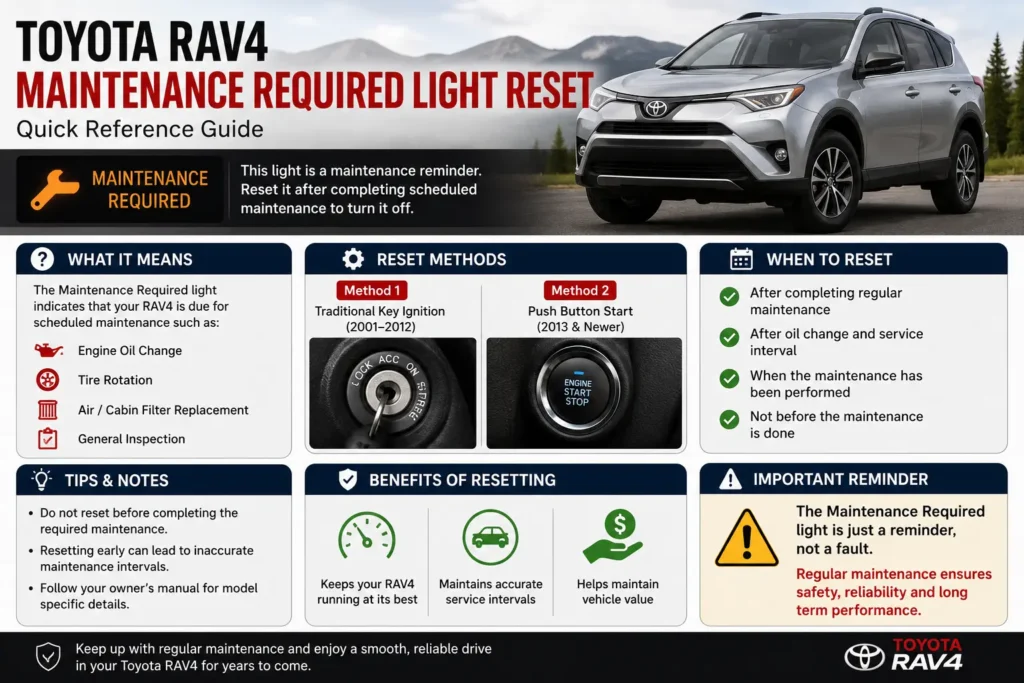
If the Toyota RAV4 Maintenance Required Light Reset message appears on your dashboard, there’s usually no need to panic. In most cases, this reminder simply means your vehicle has reached its scheduled maintenance interval, such as an oil change or routine service. It is not the same as the Check Engine Light and does not always indicate a mechanical problem.
Knowing how to perform a Toyota RAV4 Maintenance Required Light Reset can save you time and prevent unnecessary trips to the dealership after completing regular maintenance. The reset procedure varies slightly depending on the model year and whether your RAV4 uses a traditional key ignition or a push-button start system. Following the correct steps ensures the reminder is cleared properly.
In this guide, you’ll learn how to reset the maintenance required light on different Toyota RAV4 model years, understand why the light appears, discover common mistakes to avoid, and find answers to frequently asked questions. Whether you own a gasoline, hybrid, or plug-in hybrid RAV4, this step-by-step tutorial will help you complete the reset safely and correctly.
What Does the Toyota RAV4 Maintenance Required Light Mean?
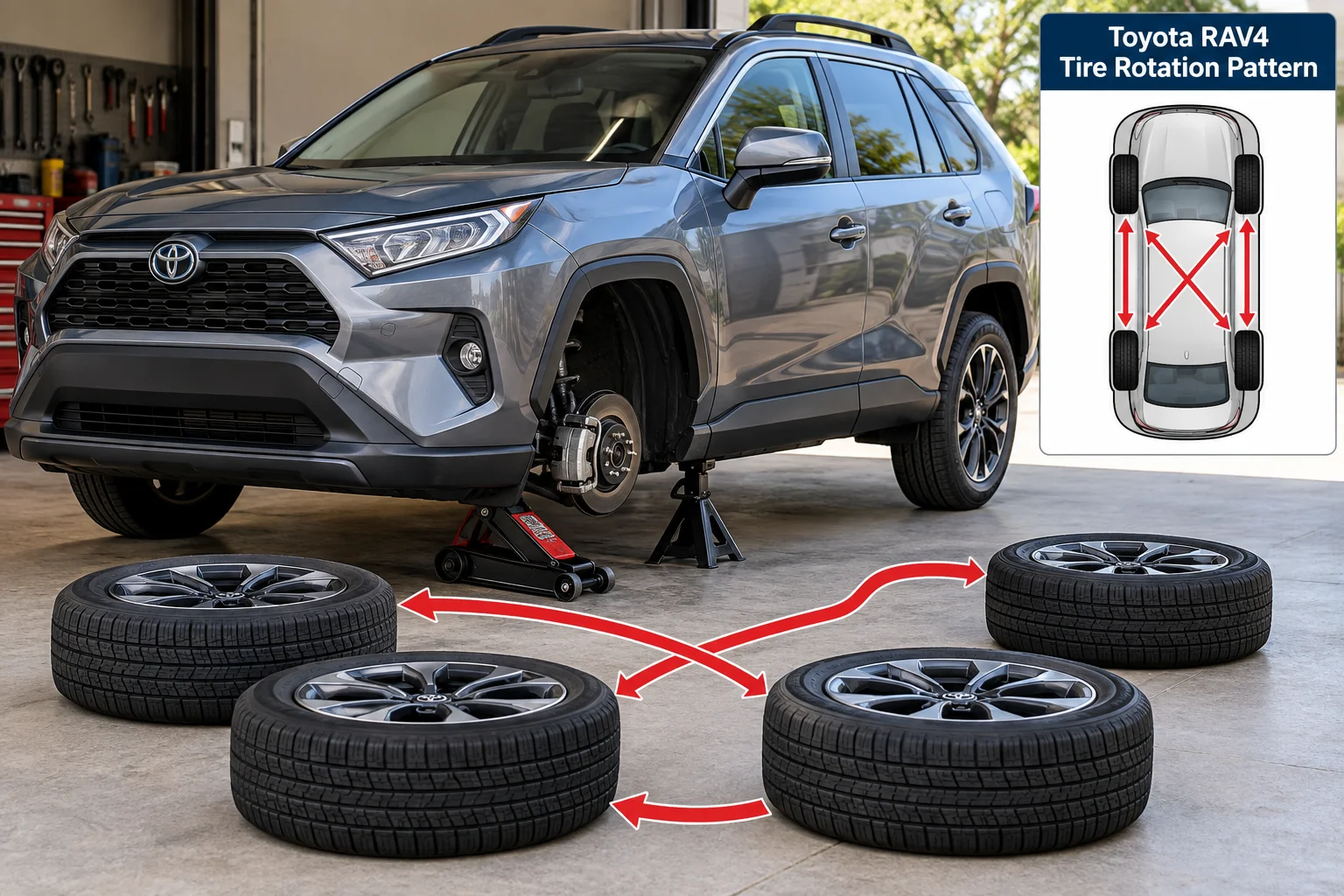
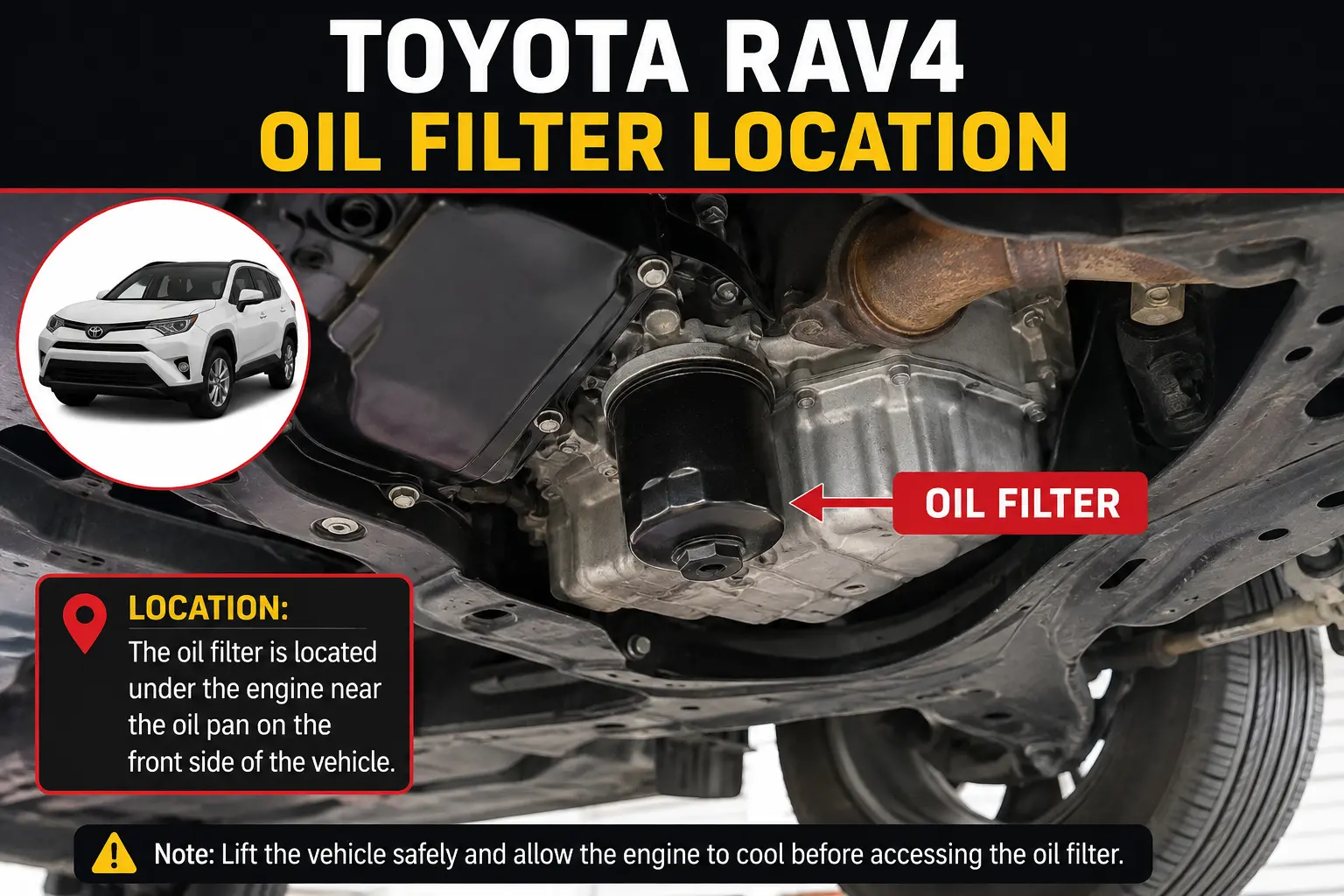
The Toyota RAV4 Maintenance Required Light is a service reminder designed to notify you that your vehicle is due for scheduled maintenance. In most Toyota RAV4 models, this light appears approximately every 5,000 miles (8,000 km) after the previous maintenance reset. It commonly reminds drivers to perform routine services such as an engine oil change, tire rotation, and a general vehicle inspection.
Unlike the Check Engine Light, the maintenance required light does not usually indicate a fault with the engine or emissions system. Instead, it follows a mileage-based schedule and helps owners maintain their vehicles according to Toyota’s recommended service intervals.
If the required maintenance has already been completed and the light remains on, performing a Toyota RAV4 Maintenance Required Light Reset will clear the reminder until the next scheduled service interval.
If you follow the correct Toyota RAV4 Maintenance Required Light Reset procedure, the reminder will disappear after scheduled maintenance has been completed. Always use the proper Toyota RAV4 Maintenance Required Light Reset method for your specific model year to avoid unnecessary confusion.
Maintenance Required Light vs Check Engine Light
| Maintenance Required Light | Check Engine Light |
|---|---|
| Service reminder | Indicates a possible engine or emissions issue |
| Appears at scheduled mileage intervals | Appears when the vehicle detects a fault |
| Usually does not require diagnostics | May require an OBD-II scan |
| Can be reset after maintenance | Should only be reset after fixing the underlying problem |
How to Reset the Toyota RAV4 Maintenance Required Light
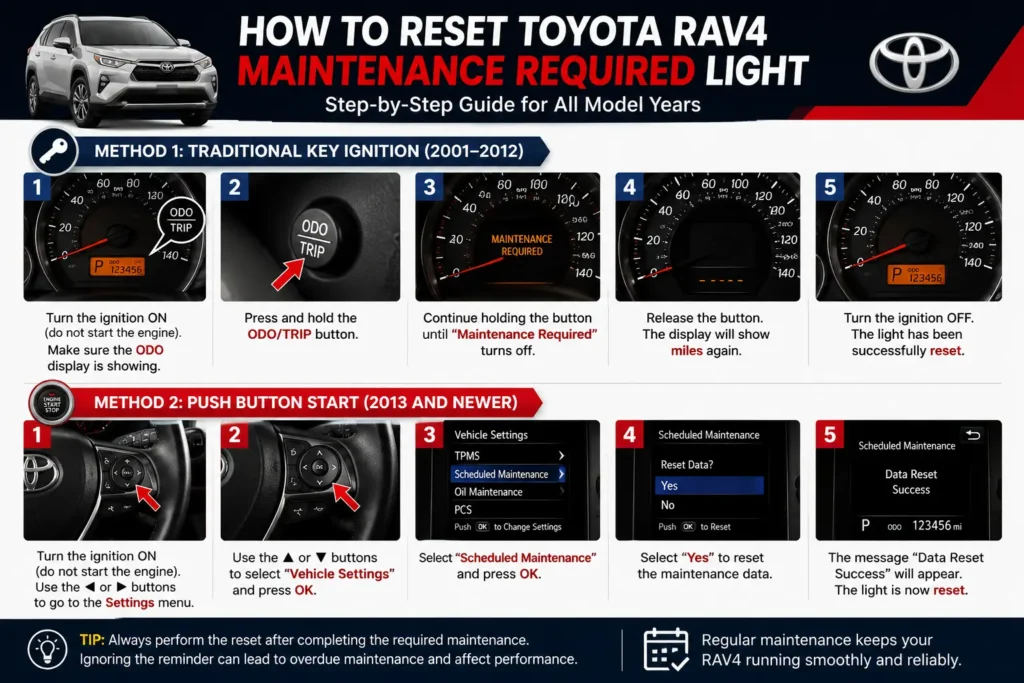
The Toyota RAV4 Maintenance Required Light Reset process depends on your vehicle’s model year and ignition system. Follow the instructions below that match your RAV4 to clear the maintenance reminder after completing the required service.
Reset for Toyota RAV4 Models with a Traditional Key (2006–2018)
- Turn the ignition OFF.
- Press and hold the Trip/ODO button on the instrument cluster.
- While holding the button, turn the ignition to the ON position without starting the engine.
- Continue holding the button until the odometer displays 000000 or the maintenance light begins to flash.
- Release the button once the maintenance reminder disappears.
- Turn the ignition OFF, then start the vehicle to confirm the maintenance light has been reset successfully.
Tip: Ensure all scheduled maintenance has been completed before performing the reset.
Reset for Toyota RAV4 Push-Button Start Models (2019–Present)
- Press the Start button twice without pressing the brake pedal to enter Ignition ON mode.
- Use the steering wheel controls to open the Settings menu on the multi-information display.
- Select Vehicle Settings or Maintenance Reset (menu names may vary by model year).
- Choose Reset Maintenance Reminder.
- Confirm by selecting Yes.
- Turn the vehicle OFF, then restart it to verify the maintenance reminder has cleared.
Note: Some trim levels may display slightly different menu names, but the reset procedure is generally the same.
How to Verify the Reset Was Successful
After completing the reset:
- Start the engine normally.
- Make sure the Maintenance Required message no longer appears.
- Check that no other warning lights remain illuminated.
- If the reminder is still displayed, repeat the procedure carefully or verify that you selected the correct reset option.
Why Won’t the Toyota RAV4 Maintenance Required Light Reset?
If the Toyota RAV4 Maintenance Required Light Reset does not work, the problem is usually related to an incorrect reset procedure or a missed step. In most cases, repeating the process carefully resolves the issue. However, if the reminder remains after multiple attempts, there may be another maintenance reminder or warning system that requires attention.
Many owners perform a Toyota RAV4 Maintenance Required Light Reset after every oil change to keep the maintenance reminder accurate. This Toyota RAV4 Maintenance Required Light Reset guide covers the safest method for all supported Toyota RAV4 model years.
Common Reasons the Reset Fails
| Possible Cause | Solution |
|---|---|
| Incorrect reset steps | Repeat the procedure exactly for your model year. |
| Wrong trip meter selected | Ensure the odometer (ODO) is displayed before starting the reset. |
| Vehicle not in the correct ignition mode | Use the ON position without starting the engine. |
| Maintenance service not completed | Complete the required maintenance before resetting the reminder. |
| Different dashboard menu on newer models | Check the owner’s manual or vehicle settings menu for your specific model year. |
When Should You Visit a Mechanic?
You should seek professional assistance if:
- The maintenance reminder returns immediately after resetting.
- The Check Engine Light is also illuminated.
- Multiple dashboard warning lights appear together.
- The vehicle shows poor performance, unusual noises, or warning messages.
- The reset procedure does not work after several correct attempts.
Important: The Maintenance Required Light is different from the Check Engine Light. If both lights are on at the same time, diagnose the engine problem before simply resetting the maintenance reminder.
Reset Steps by Model Year
Although the Toyota RAV4 Maintenance Required Light Reset process is similar across most models, the exact steps can vary depending on the model year and dashboard design. Use the table below to quickly find the correct reset method for your RAV4.
| Toyota RAV4 Model Year | Reset Method |
|---|---|
| 2006–2012 | Trip/ODO button reset |
| 2013–2018 | Trip/ODO button reset |
| 2019–2021 | Multi-Information Display (MID) menu |
| 2022–2026 | Vehicle Settings → Maintenance Reset |
Tip: If your RAV4 has a push-button start system, always enter Ignition ON mode without pressing the brake pedal before starting the reset process.
How Often Should You Reset the Maintenance Light?
You should only reset the maintenance reminder after completing the scheduled service. Resetting the light without performing maintenance can cause you to miss important services that help keep your Toyota RAV4 running safely and efficiently.
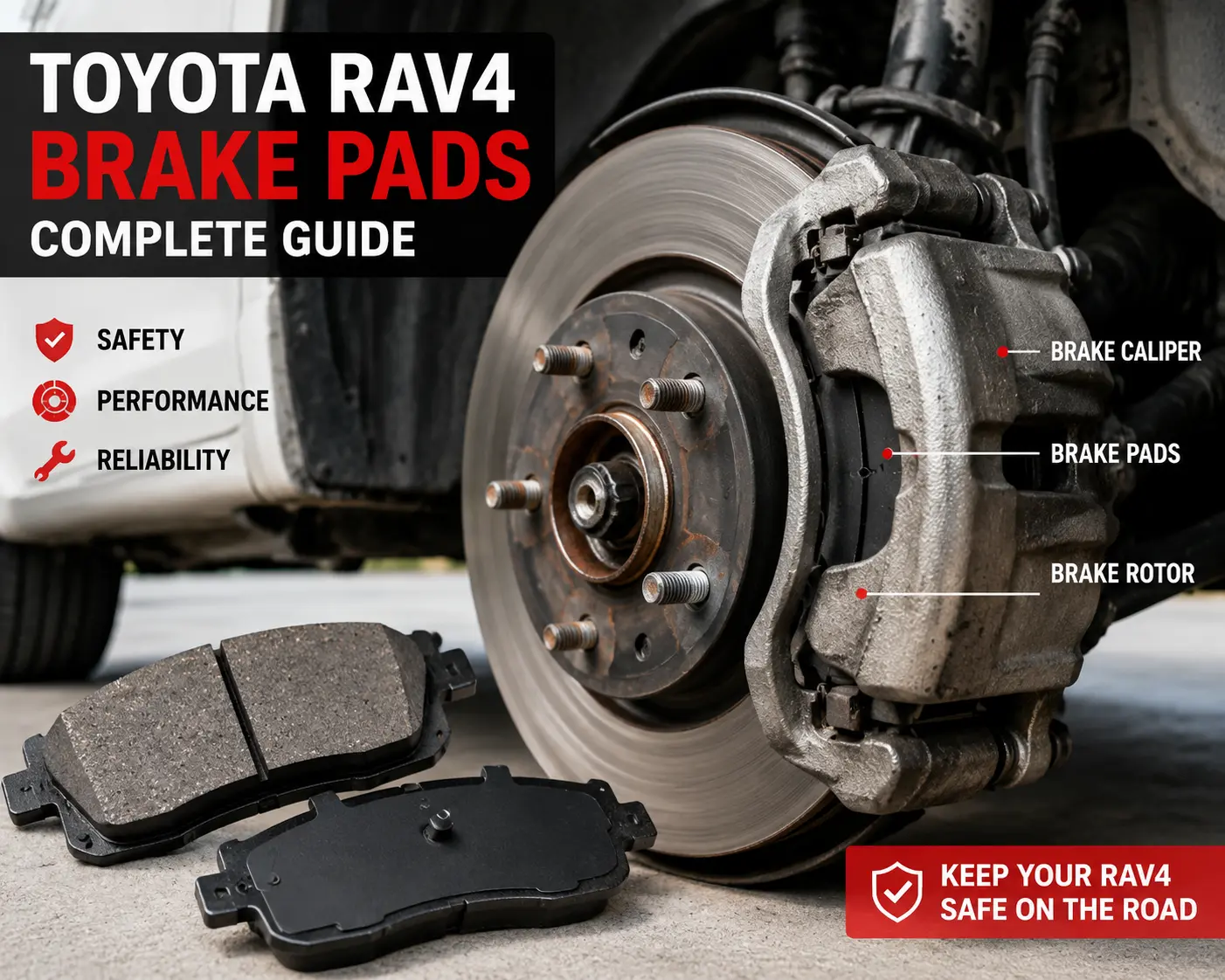
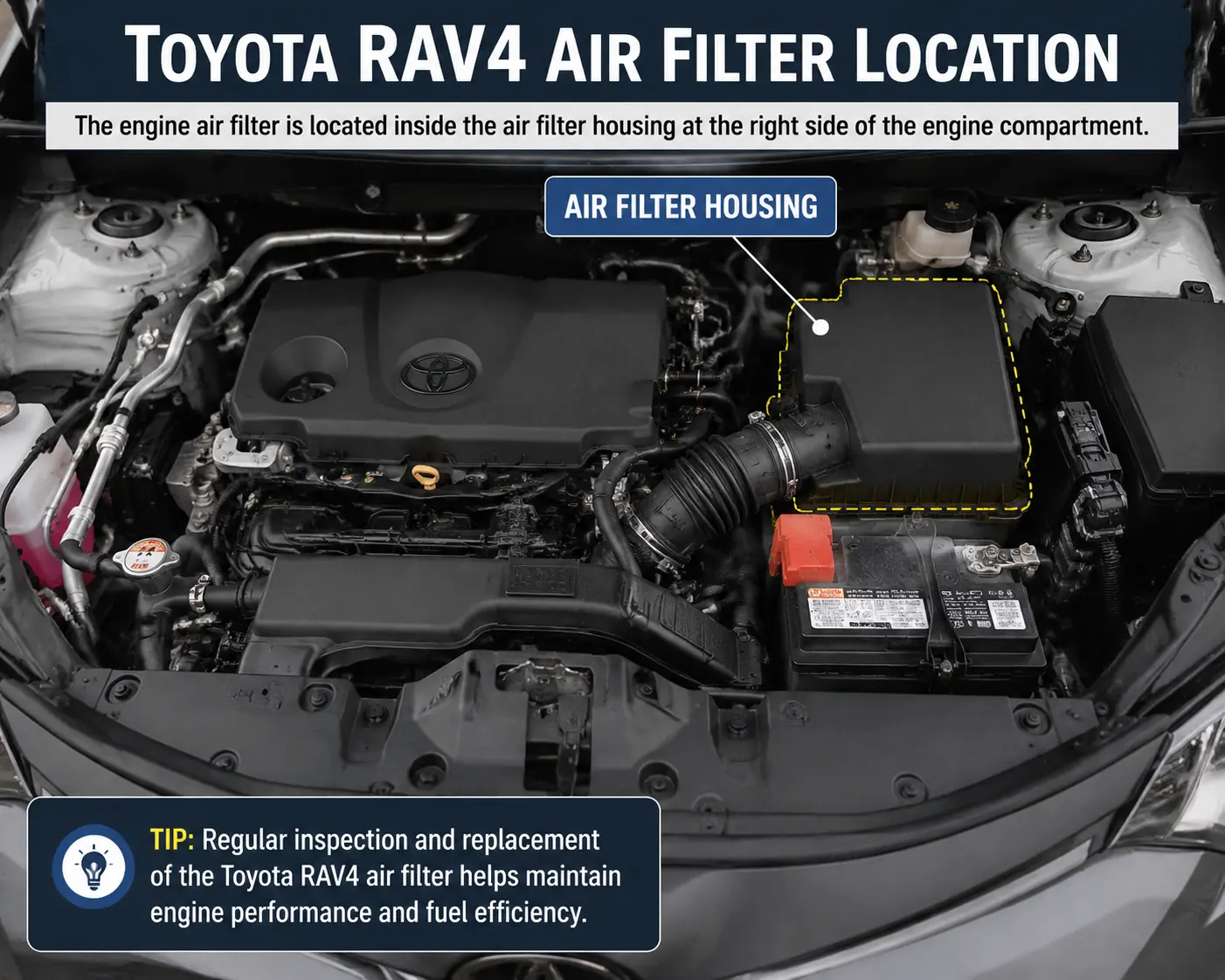
Toyota typically recommends routine maintenance every 5,000 miles (8,000 km), although some services, such as engine oil replacement, air filter changes, or spark plug replacement, may follow different intervals depending on the model year, engine type, and driving conditions.
For the best results, always follow the maintenance schedule listed in your owner’s manual or Toyota’s official service recommendations.
Safety Tips Before Resetting
Before resetting the maintenance reminder, keep these safety tips in mind:
- Park your Toyota RAV4 on a level surface.
- Shift the transmission to Park (P).
- Apply the parking brake before beginning the procedure.
- Do not start the engine unless the reset instructions specifically require it.
- Complete the scheduled maintenance before clearing the reminder.
- Keep the vehicle battery properly charged to avoid interrupting the reset process.
Safety Tip: Resetting the maintenance reminder does not fix mechanical issues. If your vehicle is making unusual noises or displaying additional warning lights, inspect the problem before driving.
Common Mistakes to Avoid
Many owners are unable to reset the maintenance reminder because of simple mistakes. Avoid the following:
| Mistake | Why It Matters |
|---|---|
| Resetting before completing maintenance | You may forget an important service interval. |
| Starting the engine instead of using Ignition ON mode | The reset sequence may not begin correctly. |
| Using Trip A or Trip B instead of ODO | The reminder may not reset. |
| Releasing the ODO button too early | The reset process will fail. |
| Ignoring other warning lights | The Maintenance Required Light is different from diagnostic warning lights. |
Can You Drive With the Maintenance Required Light On?
Yes, in most cases you can continue driving if only the Maintenance Required Light is illuminated. This light is simply a reminder that your Toyota RAV4 is due for scheduled maintenance and does not usually indicate an immediate mechanical failure.
However, you should schedule the recommended service as soon as possible. Ignoring the reminder for an extended period may lead to overdue maintenance, which can affect engine performance, fuel economy, and the long-term reliability of your vehicle.
Important: If the Check Engine Light, oil pressure warning, battery warning, or other critical dashboard lights appear along with the maintenance reminder, stop driving if necessary and inspect the problem immediately.
Maintenance Required Light vs Oil Change Light
Many Toyota RAV4 owners think these two reminders are the same, but they are slightly different depending on the model year.
| Maintenance Required Light | Oil Change Light |
|---|---|
| Reminds you of scheduled maintenance | Specifically reminds you to change the engine oil |
| Mileage-based reminder | Oil service reminder |
| Can include tire rotation and inspections | Focuses mainly on engine oil service |
| Reset after scheduled maintenance | Reset after completing an oil change |
Pro Tips
- Keep a record of every maintenance service.
- Reset the reminder only after completing the required maintenance.
- Follow Toyota’s recommended maintenance schedule for your model year.
- Use genuine Toyota parts and the recommended engine oil whenever possible.
- If the reminder returns immediately after resetting, double-check the reset steps or inspect the vehicle for other maintenance issues.
Conclusion
Resetting the Toyota RAV4 Maintenance Required Light is a simple process once you know the correct steps for your model year. Whether your RAV4 uses a traditional key ignition or a push-button start system, following the proper reset procedure after completing scheduled maintenance ensures the reminder is cleared correctly.
Remember that the Maintenance Required Light is a service reminder—not a fault indicator. It is designed to help you stay on top of routine maintenance such as oil changes, tire rotations, and regular inspections. Ignoring the reminder for long periods can lead to missed maintenance and may affect your vehicle’s long-term reliability.
If the light does not reset after following the correct procedure, repeat the steps carefully and confirm that the required maintenance has been completed. When additional warning lights appear or the vehicle shows unusual symptoms, diagnose the underlying issue before resetting any maintenance reminders.
Performing a Toyota RAV4 Maintenance Required Light Reset is a simple task that helps clear the maintenance reminder after completing scheduled service. Following the correct Toyota RAV4 Maintenance Required Light Reset procedure for your specific model year ensures the reminder is cleared safely without affecting other vehicle settings. Remember that a Toyota RAV4 Maintenance Required Light Reset should only be performed after the required maintenance has been completed, not to ignore service intervals. By using this complete Toyota RAV4 Maintenance Required Light Reset guide, you can keep your RAV4 properly maintained and avoid unnecessary warning reminders.
FAQs
How do I reset the Toyota RAV4 maintenance required light?
The reset method depends on the model year. Older models typically use the Trip/ODO button, while newer models allow you to reset the reminder through the vehicle settings menu.
Why is my maintenance required light still on after an oil change?
The reminder must be reset manually after the oil change. If it remains on, repeat the correct reset procedure for your model year.
Is the maintenance required light the same as the check engine light?
No. The Maintenance Required Light is a scheduled service reminder, while the Check Engine Light indicates that the vehicle has detected a fault that may require diagnosis.
Can I drive with the maintenance required light on?
Yes, in most cases you can continue driving safely. However, you should complete the recommended maintenance as soon as possible.
How often does the maintenance required light come on?
It usually appears every 5,000 miles (8,000 km), although the interval may vary depending on the model year and maintenance schedule.
Will disconnecting the battery reset the maintenance light?
Not always. The recommended method is to use the official reset procedure for your Toyota RAV4 model.
Why won’t my maintenance light reset?
Common reasons include using the wrong reset procedure, not selecting the ODO display, or releasing the reset button too early.
Should I reset the maintenance reminder before servicing my RAV4?
No. Always complete the required maintenance first, then reset the reminder so your next service interval is tracked correctly.
How do I perform a Toyota RAV4 Maintenance Required Light Reset?
To perform a Toyota RAV4 Maintenance Required Light Reset, first complete the required maintenance, such as an oil change or scheduled service. Then follow the reset procedure for your specific model year, whether your RAV4 has a traditional key ignition or a push-button start. Performing the Toyota RAV4 Maintenance Required Light Reset after maintenance ensures the reminder is cleared correctly without affecting your vehicle’s settings.